Mobile Uninstall Tracking
DriveMetaData can use push notification infrastructure to support uninstall tracking workflows. For Android, this requires Firebase Cloud Messaging setup and secure handling of Firebase service account credentials.
Android Device Token Collection
Collect the Firebase Cloud Messaging token and send it as a DriveMetaData deviceToken event.
private void tokenGeneration() {
    FirebaseMessaging.getInstance().getToken()
        .addOnCompleteListener(task -> {
            if (task.isSuccessful()) {
                String token = task.getResult();
                JSONObject deviceToken = new JSONObject();
                JSONObject userIdentifier = new JSONObject();
                JSONObject payload = new JSONObject();

                try {
                    deviceToken.put("device_token", token);
                    userIdentifier.put("customer_id", "customer_123");
                    userIdentifier.put("mobile", "+15555550123");
                    payload.put("deviceNotificationToken", deviceToken);
                    payload.put("userIdentifier", userIdentifier);

                    DriveMetaData.with(this).sendTags(payload.toString(), "deviceToken");
                } catch (JSONException exception) {
                    exception.printStackTrace();
                }
            } else {
                Log.e("FCM Token", "Failed to get token", task.getException());
            }
        });
}
Use your production customer identifiers. Do not hard-code real phone numbers, customer IDs, or test secrets in application source.
Firebase Service Account JSON
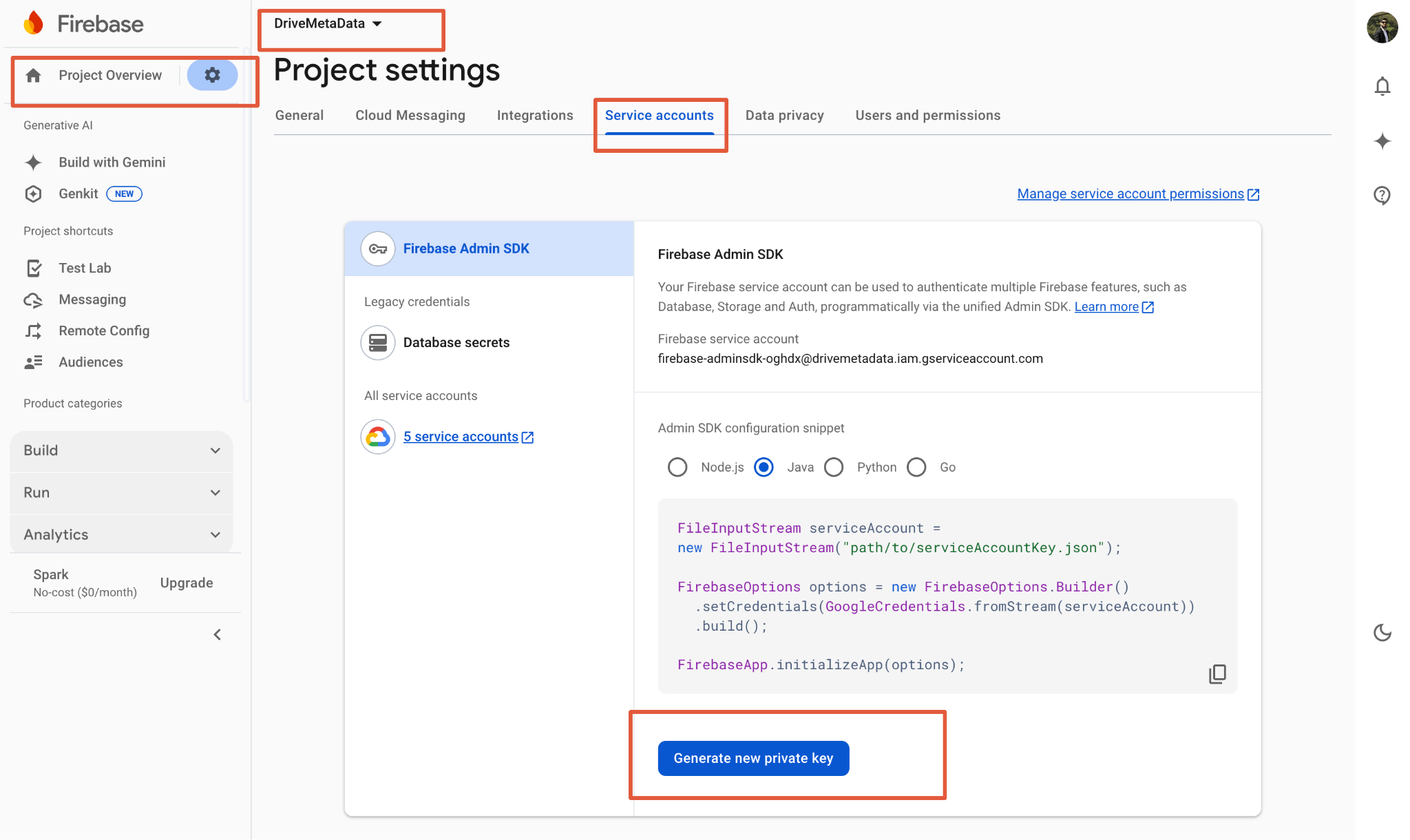
To generate the service account JSON file:
- Open Firebase Console.
- Select the Firebase project used by the app.
- Open Project settings.
- Go to Service accounts.
- Under Firebase Admin SDK, choose Generate new private key.
- Download the
.jsonfile.
Credential Handling
The service account JSON contains sensitive credentials.
- Do not commit it to a repository.
- Store it in a secrets manager or restricted operational vault.
- Rotate it if it is exposed.
- Share it with DriveMetaData only through an approved secure channel when DriveMetaData operates the uninstall tracking workflow for your app.
Validation
- Confirm device tokens are sent after install and token refresh.
- Confirm token payloads include a stable
userIdentifier. - Test app install, app open, token refresh, and uninstall monitoring flows in a non-production environment before release.